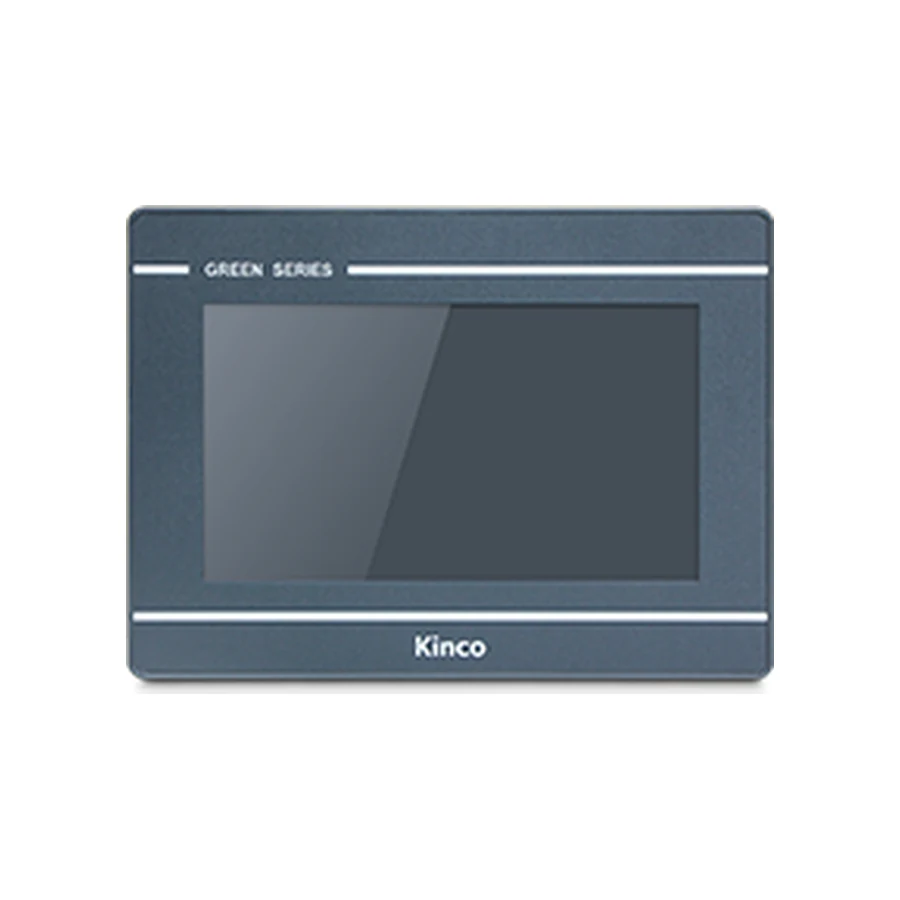
Kinco GL070 7-inch HMI panel, representative front appearance, dark bezel with silver horizontal trim

Kinco GL070 7-inch HMI panel: representative front appearance for this model group. Compare the full model codes below for interface and configuration differences.

Basic SERIES · GL070

Kinco GL070 / GL070E 7-inch HMI Panel

Model codes: GL070 | GL070E

The Kinco GL070 and GL070E offer a 7-inch 800 × 480 display with a 192 × 138 mm cut-out. Consider this pair when a DTools operator layout already matches those screen dimensions and the connection choice is between serial and wired Ethernet. The E code adds one network port; it does not confirm a particular PLC protocol. Check the 37.2 mm body depth, cable routing and full project target when assessing an existing cabinet.

Generation: Green Series - Economical (GL) in the Basic series

7" display · 800 × 480Resistive touchARM RISC 32-bit 800 MHz2 serial ports and 1 USB host port

Choose from 2 model variants with the same display size and resolution. Confirm the exact code on the cabinet label before ordering.

Available for quotation — specify the full code, quantity and destination.

Supplied by CINKR. Confirm the panel cut-out, the interfaces and the protocol before ordering.

EXACT MODEL CODE

Compare GL070 model codes

Match the full code to the PLC connection, project software and cabinet opening. An option listed for one code does not apply to every code on this page.

Per-code connection and mechanical requirements
Full model codeSerial portsEthernetWi-Fi4GInput powerCut-outBody W × H × DSoftwareRemote platform
GL070COM0: RS232/RS485/RS422 · COM2: RS232Not offered on this modelNot offered on this modelNot offered on this modelDC 10 to 28 V192 × 138 mm204 × 150 × 37.2 mmKinco DToolsNot offered on this model
GL070ECOM0: RS232/RS485/RS422 · COM2: RS2321 portNot offered on this modelNot offered on this modelDC 10 to 28 V192 × 138 mm204 × 150 × 37.2 mmKinco DToolsEdgeAccess 1.0
GL070 panel opening illustration192 mm cut-out width138 mm cut-out heightGL070
Illustrative opening for the base code. Use the applicable dimension drawing to machine the panel; this sketch does not show connector positions or pinout.

Before fitting the panel

Base-code opening
192 × 138 mm
Body dimensions
204 × 150 × 37.2 mm
Power supply
DC 10 to 28 V
Project software
Kinco DTools

Check door thickness, clip access, ventilation and cable bend clearance. Compare the full variant code before reusing an opening or cable.

Request the applicable installation drawing →

PRODUCT GUIDE

About the GL070 | GL070E

The Kinco GL070 and GL070E offer a 7-inch 800 × 480 display with a 192 × 138 mm cut-out. Consider this pair when a DTools operator layout already matches those screen dimensions and the connection choice is between serial and wired Ethernet. The E code adds one network port; it does not confirm a particular PLC protocol. Check the 37.2 mm body depth, cable routing and full project target when assessing an existing cabinet.

GL070E adds Ethernet and the EdgeAccess 1.0 remote platform.

QUICK DECISION

Know where this panel fits before you compare specifications.

BEST FIT

Choose GL070 | GL070E when you need:

  • A 7-inch economical panel where the choice between serial and Ethernet can be made from the full model code.
  • Use 192 × 138 mm for the cabinet opening and 204 × 150 × 37.2 mm for body clearance. The DC 10 to 28 V supply must match the exact panel label.

CHECK BEFORE ORDERING

Confirm these details first:

  • 2 model codes (GL070 | GL070E) share this display size and resolution; confirm which code matches the cabinet label.
  • Compare the published panel cut-out and panel body depth with the opening and the space behind the machine door.
  • Check the protocol and connector arrangement the machine program expects against the published interface set.

CONSIDER ANOTHER CODE IF

Your machine instead requires:

  • Choose another model if the opening, software family or required PLC driver differs. Compare GT2070HE, M2070H, MT070 before changing the machine design.

The Kinco GL070 and GL070E offer a 7-inch 800 × 480 display with a 192 × 138 mm cut-out. Consider this pair when a DTools operator layout already matches those screen dimensions and the connection choice is between serial and wired Ethernet. The E code adds one network port; it does not confirm a particular PLC protocol. Check the 37.2 mm body depth, cable routing and full project target when assessing an existing cabinet.

Model codes: GL070 | GL070E

Kinco GL070 HMI Panel Overview

GL070 suits a selection process that begins with an established operator layout rather than a screen diagonal alone. An existing 800 × 480 DTools project provides a useful reference for page proportions, but the target model, driver and installed connections still need individual review. A project that looks correct in the editor may use resources or functions that require attention on a different target.

Use this page to decide between GL070 and GL070E, assess cabinet fit and prepare a document or quotation request. Keep the complete code in purchasing records. The shared front size should not hide the Ethernet difference when maintenance teams identify spare panels or prepare a replacement bill of materials.

GL070 for Established DTools Control Layouts

A 7-inch page can group normal operating values with a clear alarm indicator and a small number of adjustments. Build a representative page using real labels, units and alarm messages. During review, ask whether operators can distinguish a running status from a command and whether numeric entry obscures information needed to make the adjustment. These are layout decisions, not capabilities established by screen size.

The panel uses 4-wire resistive touch. Evaluate button spacing and the intended operating method on the physical screen where practical. If a compact station is the main constraint, compare the Kinco GL043 smaller panel; if the operator needs more viewing area, review the Kinco GL100 larger display. Each alternative introduces its own opening and target requirements. Enlarging the cabinet or shrinking controls should follow the machine task, rather than serve as an automatic response to a crowded page.

GL070 and GL070E Network Port and Memory Comparison

GL070E adds one Ethernet port and the listed EdgeAccess 1.0 remote platform. GL070 has no Ethernet port. Neither code lists WiFi or cellular connectivity, so an application requiring those connections needs a separately supported solution and a documented network design. A remote platform listing does not establish service availability or approval for a particular installation.

Both codes list 128 MB RAM and 256 MB flash. Review the actual project resource use, including graphics and retained application data, instead of interpreting those figures as storage available entirely to one feature. Memory capacity does not predict response time for an untested collection of screens and communication requests.

The serial hardware remains COM0 with RS232, RS485 and RS422 options, plus COM2 with RS232. Confirm how the selected driver uses those interfaces before planning cable reuse or simultaneous connections.

GL070 PLC Ports and Driver Checks

Match GL070 PLC Drivers and Cable Pinout

Make a connection record containing the PLC CPU, firmware, communication module if present, protocol and HMI driver. For a serial application, include electrical mode, station parameters and the applicable cable drawing. For GL070E, include the PLC’s actual network interface and configured addressing. Ethernet hardware alone does not establish a usable driver or supported protocol.

The PLC compatibility guide provides a structured way to review those dependencies. Establish a known read-only value before testing operator commands. Any controlled write must be agreed with the PLC owner, use an understood test condition and preserve machine interlocks and safety logic.

If the screen loads but PLC values do not update, avoid changing unrelated settings together. The PLC communication troubleshooting guide helps distinguish an interface problem from a driver, parameter or addressing issue while preserving a useful record of the investigation.

GL070 192 × 138 mm Cut-out and Body Dimensions

Measure the 192 × 138 mm Opening for GL070

The listed opening is 192 × 138 mm and the body is 204 × 150 × 37.2 mm. Measure the cabinet opening directly; the outside bezel and display diagonal describe different dimensions. Inspect the usable mounting surface, surrounding door hardware and access for clips before accepting an existing opening.

Allow space beyond the 37.2 mm body for connector housings and cable bends. Open the door through its normal movement and consider whether the cable route will pull on a connection or contact nearby equipment. Obtain the installation drawing for the selected code rather than deriving a connector layout from the photograph or cut-out sketch.

GL070 lists DC 10 to 28 V input. Confirm polarity, grounding, installed supply conditions and the cabinet load budget. The installation decision should account for the entire wiring arrangement, not just a matching nominal supply voltage.

DTools Software for GL070

Select the GL070 Target in DTools

Kinco DTools is the listed configuration software for both codes. Record the release associated with the working project and retain its editable source before changing a target or downloading. Work from a copy when examining whether an existing GL070 application can be maintained with the intended software installation.

The guide to DTools software for GL070 covers software sourcing and target checks. Request an applicable GL070 or GL070E manual when you need transfer instructions, driver details or wiring information. Include the hardware revision when available and describe the task; a general datasheet may not answer a cable question.

Review navigation, languages, alarms, recipes and number formats after any project change. Confirm that a downloaded application displays valid data and that operator actions retain their intended meaning. Compilation and screen transfer do not complete machine acceptance.

GL070 Existing-Panel Fit and Project Checks

The Kinco GT2070HE HMI Panel is a comparison candidate with a listed 192 × 138 mm opening and Kinco DTools software. Its 1024 × 600 display differs from the GL070’s 800 × 480 resolution. That distinction matters even when the door opening is the same: the target and page layout require review, rather than an assumption that an existing file transfers unchanged.

Compare the old and proposed panel labels, body clearances, supply requirements and connector documentation. A purchasing cross-reference can identify a candidate, but it cannot confirm project reuse or the final installation.

Use GL070 project migration checks for the broader software assessment and the panel replacement checklist to organize the machine change. Keep the original program and settings available until the replacement has been accepted by the responsible engineering team.

GL070 Price and Quotation Details

An inquiry should state GL070 or GL070E, quantity, destination and the required delivery date. If the machine depends on Ethernet, identify that requirement instead of requesting an unspecified 7-inch GL panel. A quotation can then address the requested code and purchasing conditions; this page does not publish a fixed price or delivery commitment.

For selection support, provide the PLC identification and project version alongside the opening measurement and old panel label. Connector photographs can help identify which documents are needed, but the applicable pinout remains the wiring reference. Describe unresolved items such as a missing editable project or an unconfirmed driver so those conditions can be reviewed before the order is finalized.

GL070 Questions and Answers

How do GL070, GL070E differ?

The E code adds one Ethernet port and the listed EdgeAccess 1.0 platform. Both share the 800 × 480 display, opening and stated serial connection options.

What cut-out and rear clearance does GL070 need?

Use the 192 × 138 mm opening and 204 × 150 × 37.2 mm body as separate checks. Add the clearance required by wiring and mounting access.

How do I check GL070 against my PLC driver and project?

Match the exact PLC configuration against the DTools driver and target. Review a project copy and test reads before any approved command test.

How can I request a GL070 datasheet, manual or quotation?

Specify the full code, revision when known and required document purpose. Include quantity and destination for price and lead-time review.

SELECTION CHECKLIST

Confirm a GL070 before ordering

  1. Measure the panel openingCompare the machine opening with the published 192 × 138 mm cut-out and the 204 × 150 × 37.2 mm panel body.
  2. List the required portsWrite down every protocol and connector the cabinet uses, then compare them with the published interface set: 2 serial ports and 1 USB host port.
  3. Confirm the program and protocolCheck which configuration software and protocol the machine program expects, then confirm the variant code that matches it.

SPECIFICATIONS

GL070 | GL070E Technical Specifications

Compare specifications by model code, including differences in interfaces, power requirements and dimensions.

Model codesGL070 | GL070E · 2 codes that share the display size and resolution
SeriesBasic series · Green Series - Economical (GL)
Interface summaryGL0702 serial portsGL070E1 port · 2 serial ports
Display
Display size7"
Resolution800 × 480
Display area154.08 × 85.92 mm (H × V)
Colours16.7 million colours
Viewing angle60/70/70/70 (T/B/L/R)
Contrast ratio500:1
BacklightLED
Brightness450 cd/m²
Backlight life30,000 hours
Touch panel4-wire resistive
Hardware
ProcessorARM RISC 32-bit 800 MHz
RAM128 MB
Flash storage256 MB
USB host1 port
USB device1 port
SD cardNot offered on this model
Interfaces
EthernetGL070Not offered on this modelGL070E1 port
Serial portsCOM0: RS232/RS485/RS422 · COM2: RS232
CANopenNot offered on this model
Wi-FiNot offered on this model
4GNot offered on this model
HDMINot offered on this model
RFIDNot offered on this model
Power
Input powerDC 10 to 28 V
Power consumption3.6W at 24 V DC
Allowable power loss< 3ms
Insulation resistance> 50 MΩ at 500 V DC
Dielectric strength500 V AC for 1 minute
Power isolationNot offered on this model
Serial port isolationNot offered on this model
Mechanical
EnclosureEngineering plastic
Panel dimensions204 × 150 × 37.2 mm
Panel cut-out192 × 138 mm
MountingPanel mounting
Front protectionIP65 (front panel)
PCB coatingNot offered on this model
Environment
Operating temperature0 to 50 °C
Operating humidity10 to 90 % RH (non-condensing)
Storage temperature-20 to 60 °C
Storage humidity10 to 90 % RH (non-condensing)
Vibration resistance10-500 Hz, 30 m/s², 1 hour each for X, Y, Z directions
CoolingNatural air circulation
Certification and software
Manufacturer-listed CE standardsEN 61000-6-4:2019, EN 61000-6-2:2019
Configuration softwareKinco DTools
Remote maintenanceGL070Not offered on this modelGL070EEdgeAccess 1.0

COMPARE RELATED PANELS

Compare GL070 | GL070E with Related Panels.

Related model codes help you avoid choosing a neighbouring size by accident. A different series or generation is not a substitute without a cut-out and port check.

ModelCut-outDisplaySoftwarePortsRelationship
GL070 | GL070E192 × 138 mm7"Kinco DTools2 serial ports · Ethernet on GL070ESelected code
GT2070HE192 × 138 mm7"Kinco DTools1 port · 3 serial portsDifferent series — confirm the cut-out, the protocol and the ports before substituting.
M2070H | M2070HE | M2070HE-WIFI192 × 138 mm7"Kinco DTools3 serial ports · Wi-Fi on M2070HE-WIFISame series, different generation — check the cut-out, ports and panel depth.
MT070 | MT070C +3 codes192 × 138 mm7"Kinco DTools3 serial ports · Ethernet on MT070E | MT070E-4G | MT070EC · 4G on MT070E-4GSame series, different generation — check the cut-out, ports and panel depth.

Related model codes show a size and interface comparison, not interchangeability. Confirm the cut-out, the port arrangement and the protocol before treating a neighbouring code as a replacement.

DOWNLOADS

GL070 | GL070E Manuals, Drawings & Software

Request the manual or dimension drawing for the full model code and hardware revision. Use the manufacturer download center for software, then check its supported target and release.

Include your full model code, revision and required document language.

GL070 manual

Operating instructions, parameter references and panel setup information.

Model codes: GL070 / GL070E

GL070 dimension drawing

Panel outline, panel cut-out and depth drawing for the machine door.

Model codes: GL070 / GL070E

Kinco DTools software

Kinco DTools project software; check the target and package release.

Model codes: GL070 / GL070E

Kinco DTools — manufacturer downloads

Kinco DTools project software; check the target and package release.

Model codes: GL070 / GL070E

V4.5.6.0 (Build20251208) · checked 2026-10-05

Official manufacturer download center

FAQ

GL070 | GL070E — Questions to Check Before Ordering.

How do GL070, GL070E differ?

The E code adds one Ethernet port and the listed EdgeAccess 1.0 platform. Both share the 800 × 480 display, opening and stated serial connection options.

What cut-out and rear clearance does GL070 need?

Use the 192 × 138 mm opening and 204 × 150 × 37.2 mm body as separate checks. Add the clearance required by wiring and mounting access.

How do I check GL070 against my PLC driver and project?

Match the exact PLC configuration against the DTools driver and target. Review a project copy and test reads before any approved command test.

How can I request a GL070 datasheet, manual or quotation?

Specify the full code, revision when known and required document purpose. Include quantity and destination for price and lead-time review.

REQUEST A QUOTE

Request a Quote for the GL070

Tell us whether the GL070 is for a new machine, an upgrade or a replacement, and include the panel opening and the interfaces in use. This form only prepares your message; nothing is submitted or stored.

Machine or replacement details (optional)
Email CINKR About GL070