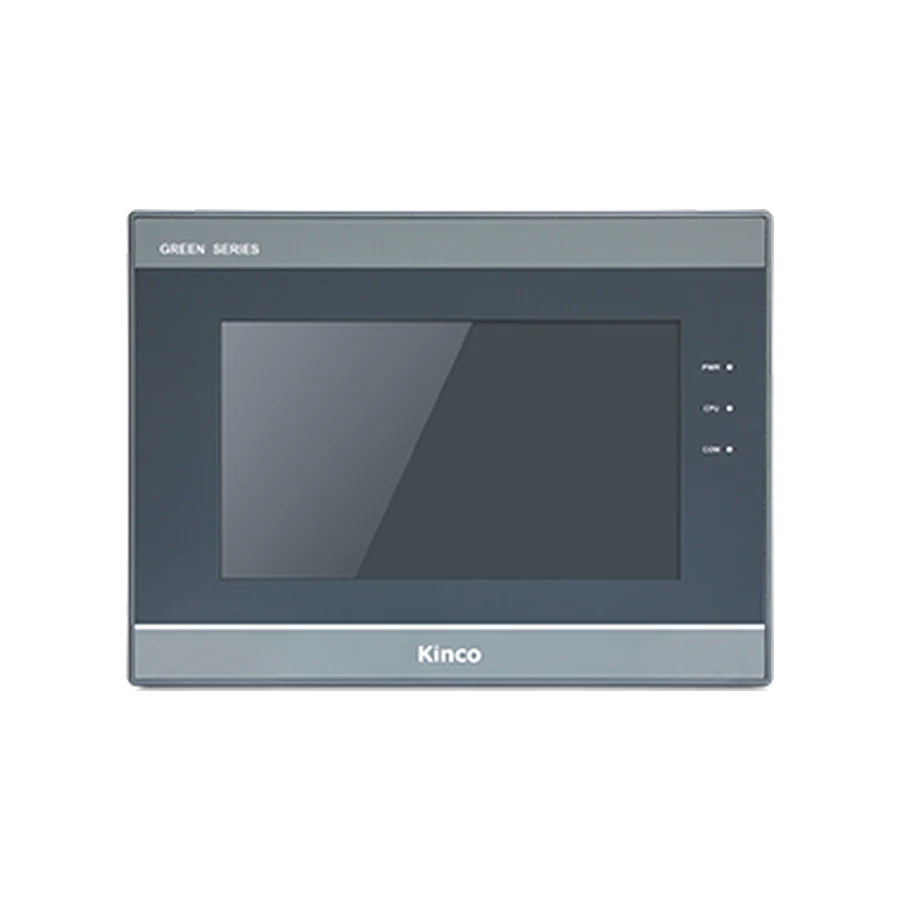
Kinco GL100 10.1-inch HMI panel, representative front appearance, dark bezel, silver trim and right-side indicator lights

Kinco GL100 10.1-inch HMI panel: representative front appearance for this model group. Compare the full model codes below for interface and configuration differences.

Basic SERIES · GL100

Kinco GL100 / GL100E 10.1-inch HMI Panel

Model codes: GL100 | GL100E

The Kinco GL100 and GL100E provide a 10.1-inch 1024 × 600 display in a 260 × 179 mm opening. This pair is worth considering when an operator layout needs more physical viewing area while retaining DTools as its configuration software. GL100E adds one Ethernet port to the serial connection choices. Allow for the 271 × 191 × 36 mm body, and compare the exact project target and PLC driver before selecting the full code.

Generation: Green Series - Economical (GL) in the Basic series

10.1" display · 1024 × 600Resistive touchARM RISC 32-bit 800 MHz2 serial ports and 1 USB host port

Choose from 2 model variants with the same display size and resolution. Confirm the exact code on the cabinet label before ordering.

Available for quotation — specify the full code, quantity and destination.

Supplied by CINKR. Confirm the panel cut-out, the interfaces and the protocol before ordering.

EXACT MODEL CODE

Compare GL100 model codes

Match the full code to the PLC connection, project software and cabinet opening. An option listed for one code does not apply to every code on this page.

Per-code connection and mechanical requirements
Full model codeSerial portsEthernetWi-Fi4GInput powerCut-outBody W × H × DSoftwareRemote platform
GL100COM0: RS232/RS485/RS422 · COM2: RS232Not offered on this modelNot offered on this modelNot offered on this modelDC 10 to 28 V260 × 179 mm271 × 191 × 36 mmKinco DToolsNot offered on this model
GL100ECOM0: RS232/RS485/RS422 · COM2: RS2321 portNot offered on this modelNot offered on this modelDC 10 to 28 V260 × 179 mm271 × 191 × 36 mmKinco DToolsEdgeAccess 1.0
GL100 panel opening illustration260 mm cut-out width179 mm cut-out heightGL100
Illustrative opening for the base code. Use the applicable dimension drawing to machine the panel; this sketch does not show connector positions or pinout.

Before fitting the panel

Base-code opening
260 × 179 mm
Body dimensions
271 × 191 × 36 mm
Power supply
DC 10 to 28 V
Project software
Kinco DTools

Check door thickness, clip access, ventilation and cable bend clearance. Compare the full variant code before reusing an opening or cable.

Request the applicable installation drawing →

PRODUCT GUIDE

About the GL100 | GL100E

The Kinco GL100 and GL100E provide a 10.1-inch 1024 × 600 display in a 260 × 179 mm opening. This pair is worth considering when an operator layout needs more physical viewing area while retaining DTools as its configuration software. GL100E adds one Ethernet port to the serial connection choices. Allow for the 271 × 191 × 36 mm body, and compare the exact project target and PLC driver before selecting the full code.

GL100E adds Ethernet and the EdgeAccess 1.0 remote platform.

QUICK DECISION

Know where this panel fits before you compare specifications.

BEST FIT

Choose GL100 | GL100E when you need:

  • A 10.1-inch GL panel for operators who need a larger view while keeping a DTools project.
  • Use 260 × 179 mm for the cabinet opening and 271 × 191 × 36 mm for body clearance. The DC 10 to 28 V supply must match the exact panel label.

CHECK BEFORE ORDERING

Confirm these details first:

  • 2 model codes (GL100 | GL100E) share this display size and resolution; confirm which code matches the cabinet label.
  • Compare the published panel cut-out and panel body depth with the opening and the space behind the machine door.
  • Check the protocol and connector arrangement the machine program expects against the published interface set.

CONSIDER ANOTHER CODE IF

Your machine instead requires:

  • Choose another model if the opening, software family or required PLC driver differs. Compare GT2100E, M2100, GL2100E before changing the machine design.

The Kinco GL100 and GL100E provide a 10.1-inch 1024 × 600 display in a 260 × 179 mm opening. This pair is worth considering when an operator layout needs more physical viewing area while retaining DTools as its configuration software. GL100E adds one Ethernet port to the serial connection choices. Allow for the 271 × 191 × 36 mm body, and compare the exact project target and PLC driver before selecting the full code.

Model codes: GL100 | GL100E

Kinco GL100 HMI Panel Overview

GL100 and GL100E address an operator-view requirement as well as a connection choice. A wider page can help place related values beside their controls, provided the designer uses that space deliberately. Identify the normal operating task, the information needed during a fault and the adjustments reserved for maintenance before deciding how much content belongs on one screen.

These codes share the stated display and cabinet dimensions. The Ethernet option is still a purchasing decision that must appear in the model record. Use the existing specification and code comparison tables for detailed values, and retain the selected code throughout software review, document requests and the quotation process.

GL100 for Larger DTools Operator Views

The 10.1-inch display is a candidate when an operator must compare several related machine values without repeatedly changing pages. A useful sample layout might place production status beside relevant settings and leave a clear route to alarms. This is a design example, not a preloaded application or an assurance about any particular machine function.

Review the 1024 × 600 layout at the intended viewing distance. More area does not justify smaller labels or crowded touch targets. The 4-wire resistive touch surface requires sensible spacing, particularly around numeric entry and navigation controls that could otherwise be confused.

For a smaller cabinet, the Kinco GL070 7-inch panel provides a separate option with different display and mounting requirements. If a taller page arrangement is central to the application, examine the Kinco GL104E 4:3 panel. Neither comparison establishes that an existing GL100 project can be transferred unchanged.

GL100 and GL100E Ethernet, COM0 and COM2

GL100 provides serial connections without Ethernet. GL100E adds one Ethernet port and the listed EdgeAccess 1.0 remote platform. Neither code lists WiFi or cellular hardware. Clarify whether the machine needs local PLC communication, a network engineering connection or a separately approved remote-service arrangement; these are different requirements.

Both codes list COM0 with RS232, RS485 and RS422 interface options, and COM2 with RS232. Select the electrical mode and cable using the applicable connection documentation. Port naming alone does not define simultaneous operation, protocol support or a suitable PLC driver.

The recorded memory is 128 MB RAM and 256 MB flash. Assess the actual application resource use in the intended software environment. Large background graphics, application data and accumulated project revisions deserve review, but these capacity figures do not establish a tested performance result or a fixed retention period for machine records.

GL100 PLC Ports and Driver Checks

Match GL100 PLC Drivers and Cable Pinout

Start with a complete PLC identity: CPU, relevant module, firmware and configured protocol. Compare it with the GL100 or GL100E driver in the DTools release you intend to use. A controller family name is too broad when different CPUs or communication modules provide different connection options.

For serial wiring, record the mode, connection assignment, station parameters and cable pinout. For Ethernet, confirm the controller’s network interface and settings rather than copying another machine’s values. Use the PLC compatibility guide to organize this review.

Validate known read-only values first. Any subsequent controlled write must have the PLC owner’s approval, a defined expected response and safe test conditions while all machine safety logic remains active. If communication fails, the HMI communication troubleshooting guide helps narrow the cause without treating a matching connector as proof of compatibility.

GL100 260 × 179 mm Cut-out and Body Dimensions

Measure the 260 × 179 mm Opening for GL100

Measure the actual opening against 260 × 179 mm and compare the surrounding space with the 271 × 191 mm body outline. The listed body depth is 36 mm. Leave additional room for connector housings, cable bends and service access as required by the installation arrangement. A shallow body does not guarantee that cables clear a nearby duct or terminal strip.

Review the door reinforcement, mounting access and cable movement with the door open and closed. Use the applicable installation drawing before cutting metal. The product image and illustrative cut-out drawing are not evidence of connector positions or pin assignments.

The stated input is DC 10 to 28 V. Confirm polarity, grounding and available supply capacity for the whole cabinet. Compare the existing wiring and power conditions with the selected code’s documentation before reusing a supply connection.

DTools Software for GL100

Select the GL100 Target in DTools

Both models list Kinco DTools. Preserve the working editable project and identify its software release before selecting another target or changing a communication driver. Keep the original machine settings with that archive so a software review does not lose the values used by production.

The guide to DTools software for GL100 explains software sourcing and target verification. Ask for the GL100 or GL100E manual and datasheet according to the code being considered. Include the revision when known, required language and whether the question concerns installation, transfer or PLC wiring.

Open a copy for inspection and review alarm messages, language resources, number formats, navigation and recipes where used. A project that opens successfully still needs communication and operating checks on the intended hardware. Treat these as acceptance tasks assigned to the machine engineering team.

GL100 Existing-Panel Fit and Project Checks

The Kinco GT2100E HMI Panel is a relevant comparison: it lists the same 260 × 179 mm opening, 1024 × 600 resolution and Kinco DTools software. Those shared values support a shortlist, but they do not confirm identical bodies, connection arrangements or supported project functions. Compare the complete codes and applicable documents before planning installation.

Changing from GL100 to GL100E also deserves a recorded review if it changes the machine’s communication method. Adding a physical port does not automatically create a supported network connection in the existing application.

Use GL100 project migration checks for project assessment and the panel replacement checklist for the wider machine change. Keep the product decision centered on display, fit, interfaces and software target rather than assuming a shared diagonal or opening resolves the engineering work.

GL100 Price and Quotation Details

Send an inquiry naming GL100 or GL100E, quantity, destination and required delivery date. Identify whether the machine uses serial communication or requires the Ethernet variant. Price and lead time are established for the inquiry; a listed model is not evidence of stock or a fixed delivery schedule.

For a replacement request, include the existing label, measured cut-out, rear-space limitations and PLC details. State the available project format and software version. If the original source is missing, make that visible in the request instead of assuming the panel selection solves project recovery. This information supports a more useful technical discussion before purchasing.

GL100 Questions and Answers

How do GL100, GL100E differ?

GL100E adds one Ethernet port and the listed EdgeAccess 1.0 remote platform. The shared display and serial hardware do not remove the need to select the proper driver.

What cut-out and rear clearance does GL100 need?

The opening is 260 × 179 mm, with a 271 × 191 × 36 mm body. Add the space required for mounting, connectors and wiring bends.

How do I check GL100 against my PLC driver and project?

Match the exact CPU and protocol to the selected DTools target. Review the editable project copy and validate communication under approved machine conditions.

How can I request a GL100 datasheet, manual or quotation?

Specify GL100 or GL100E and the document task. Add revision information when available, plus quantity and destination for a quotation.

SELECTION CHECKLIST

Confirm a GL100 before ordering

  1. Measure the panel openingCompare the machine opening with the published 260 × 179 mm cut-out and the 271 × 191 × 36 mm panel body.
  2. List the required portsWrite down every protocol and connector the cabinet uses, then compare them with the published interface set: 2 serial ports and 1 USB host port.
  3. Confirm the program and protocolCheck which configuration software and protocol the machine program expects, then confirm the variant code that matches it.

SPECIFICATIONS

GL100 | GL100E Technical Specifications

Compare specifications by model code, including differences in interfaces, power requirements and dimensions.

Model codesGL100 | GL100E · 2 codes that share the display size and resolution
SeriesBasic series · Green Series - Economical (GL)
Interface summaryGL1002 serial portsGL100E1 port · 2 serial ports
Display
Display size10.1"
Resolution1024 × 600
Display area222.72 × 125.28 mm (H × V)
Colours16.7 million colours
Viewing angle85/85/85/85 (T/B/L/R)
Contrast ratio500:1
BacklightLED
Brightness300 cd/m²
Backlight life30,000 hours
Touch panel4-wire resistive
Hardware
ProcessorARM RISC 32-bit 800 MHz
RAM128 MB
Flash storage256 MB
USB host1 port
USB device1 port
SD cardNot offered on this model
Interfaces
EthernetGL100Not offered on this modelGL100E1 port
Serial portsCOM0: RS232/RS485/RS422 · COM2: RS232
CANopenNot offered on this model
Wi-FiNot offered on this model
4GNot offered on this model
HDMINot offered on this model
RFIDNot offered on this model
Power
Input powerDC 10 to 28 V
Power consumption6W at 24 V DC
Allowable power loss< 3ms
Insulation resistance> 50 MΩ at 500 V DC
Dielectric strength500 V AC for 1 minute
Power isolationNot offered on this model
Serial port isolationNot offered on this model
Mechanical
EnclosureEngineering plastic
Panel dimensions271 × 191 × 36 mm
Panel cut-out260 × 179 mm
MountingPanel mounting
Front protectionIP65 (front panel)
PCB coatingNot offered on this model
Environment
Operating temperature0 to 50 °C
Operating humidity10 to 90 % RH (non-condensing)
Storage temperature-20 to 60 °C
Storage humidity10 to 90 % RH (non-condensing)
Vibration resistance10-500 Hz, 30 m/s², 1 hour each for X, Y, Z directions
CoolingNatural air circulation
Certification and software
Manufacturer-listed CE standardsEN 61000-6-4:2019, EN 61000-6-2:2019
Configuration softwareKinco DTools
Remote maintenanceGL100Not offered on this modelGL100EEdgeAccess 1.0

COMPARE RELATED PANELS

Compare GL100 | GL100E with Related Panels.

Related model codes help you avoid choosing a neighbouring size by accident. A different series or generation is not a substitute without a cut-out and port check.

ModelCut-outDisplaySoftwarePortsRelationship
GL100 | GL100E260 × 179 mm10.1"Kinco DTools2 serial ports · Ethernet on GL100ESelected code
GT2100E260 × 179 mm10.1"Kinco DTools1 port · 3 serial portsDifferent series — confirm the cut-out, the protocol and the ports before substituting.
M2100 | M2100E | M2100E-WIFI260 × 179 mm10.1"Kinco DTools3 serial ports · Ethernet on M2100E | M2100E-WIFI · Wi-Fi on M2100E-WIFISame series, different generation — check the cut-out, ports and panel depth.
GL2100E | GL2100E-4G | GL2100E-WIFI260 × 179 mm10.1"Kinco DTools Pro1 port · 3 serial ports · Wi-Fi on GL2100E-WIFI · 4G on GL2100E-4GSame series, different generation — check the cut-out, ports and panel depth.

Related model codes show a size and interface comparison, not interchangeability. Confirm the cut-out, the port arrangement and the protocol before treating a neighbouring code as a replacement.

DOWNLOADS

GL100 | GL100E Manuals, Drawings & Software

Request the manual or dimension drawing for the full model code and hardware revision. Use the manufacturer download center for software, then check its supported target and release.

Include your full model code, revision and required document language.

GL100 manual

Operating instructions, parameter references and panel setup information.

Model codes: GL100 / GL100E

GL100 dimension drawing

Panel outline, panel cut-out and depth drawing for the machine door.

Model codes: GL100 / GL100E

Kinco DTools software

Kinco DTools project software; check the target and package release.

Model codes: GL100 / GL100E

Kinco DTools — manufacturer downloads

Kinco DTools project software; check the target and package release.

Model codes: GL100 / GL100E

V4.5.6.0 (Build20251208) · checked 2026-10-05

Official manufacturer download center

FAQ

GL100 | GL100E — Questions to Check Before Ordering.

How do GL100, GL100E differ?

GL100E adds one Ethernet port and the listed EdgeAccess 1.0 remote platform. The shared display and serial hardware do not remove the need to select the proper driver.

What cut-out and rear clearance does GL100 need?

The opening is 260 × 179 mm, with a 271 × 191 × 36 mm body. Add the space required for mounting, connectors and wiring bends.

How do I check GL100 against my PLC driver and project?

Match the exact CPU and protocol to the selected DTools target. Review the editable project copy and validate communication under approved machine conditions.

How can I request a GL100 datasheet, manual or quotation?

Specify GL100 or GL100E and the document task. Add revision information when available, plus quantity and destination for a quotation.

REQUEST A QUOTE

Request a Quote for the GL100

Tell us whether the GL100 is for a new machine, an upgrade or a replacement, and include the panel opening and the interfaces in use. This form only prepares your message; nothing is submitted or stored.

Machine or replacement details (optional)
Email CINKR About GL100